¶ TeklaAppExtension Developer Guide
¶ Overview
TeklaAppExtension is a template for creating Tekla Structures add-ins that integrate with Assistant. This template provides a foundation for building MVVM-based Tekla applications with a modern UI using WPF-UI.
¶ Getting started
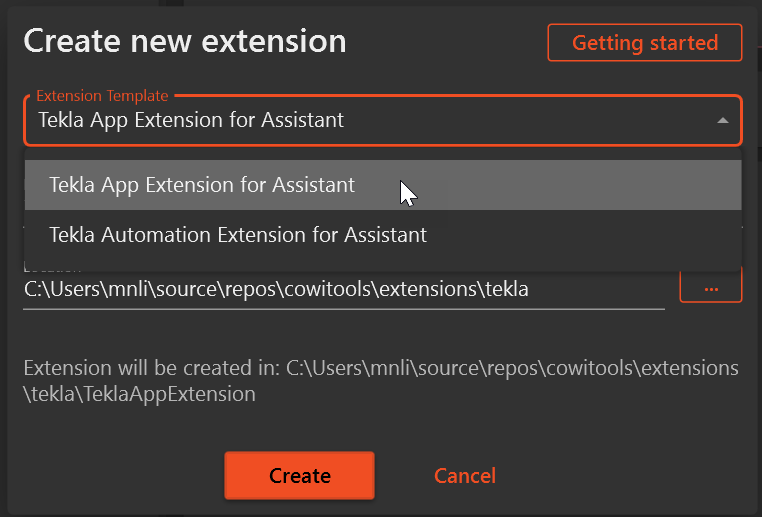
Create a new Extension by selecting the template "Tekla App Extension for Assistant"
¶ Glossary
- MVVM - Model-View-ViewModel pattern that separates the user interface from business logic and data
- WPF-UI - A modern UI library for WPF that follows Windows 11 design language
- DI - Dependency Injection, a technique where an object receives other objects it depends on
- Constructor Injection - Defining dependencies as parameters to a class's constructor
- IFluentCommand - Interface for commands that allow method chaining for sophisticated command flows
- ViewModel - A component that converts model information into values that can be displayed in a view
- Data Binding - The process that establishes a connection between the UI and business logic
- User-Defined Attribute (UDA) - Custom attributes that can be added to Tekla objects to store metadata
¶ Project Structure
The template is organized according to the MVVM pattern:
- Framework/ - Shared helpers, converters, and resources
- ViewModels/ - View models that drive the UI behavior
- Views/ - XAML views for the UI
- Resources/ - Shared resources like view bindings
- TeklaAppExtensionCommand.cs - The entry point for the Tekla extension
- TeklaAppExtensionArgs.cs - Initial configuration passed into the app on startup
- TeklaService.cs - Service for interacting with the Tekla Structures API
¶ Entry Point and Initialization
The application starts with TeklaAppExtensionCommand.cs, which implements the ITeklaExtension<T> interface. The Run method is the entry point:
public IExtensionResult Run(ITeklaExtensionContext context, TeklaAppExtensionArgs args, CancellationToken cancellationToken)
{
    // Create a service provider with all required services registered
    var provider = ServiceFactory.Create(services =>
    {
        services.RegisterAppServices(args);
    });

    // Get the handle of the current process main window (Tekla Structures)
    var handle = Process.GetCurrentProcess().MainWindowHandle;

    // Show the application main window
    WindowHandler.ShowWindow<MainWindow>(provider, handle);

    // Return a result indicating success
    return Result.Text.Succeeded("App started");
}
¶ Initial User Input
Initial user inputs are handled through the TeklaAppExtensionArgs class:
public class TeklaAppExtensionArgs
{
    public string InitialComment { get; set; } = "Default comment";
}
This class can be extended with additional properties to capture different types of user input for your application. Properties in this class are automatically parsed into UI elements in the Extension Task configuration in Assistant.
¶ Dependency Registration
Dependencies are registered in the Registrations.cs file using the .NET Dependency Injection framework. The template uses a RegisterAppServices extension method on IServiceCollection to configure all required services:
public static IServiceCollection RegisterAppServices(this IServiceCollection services, TeklaAppExtensionArgs args)
{
    // Register user arguments
    services.AddSingleton(args);

    // Register view models
    services.AddSingleton<MainWindow>();
    services.AddSingleton<HomeViewModel>();
    services.AddSingleton<AboutViewModel>();

    // Register the Tekla service
    services.AddSingleton<ITeklaService, TeklaService>();

    return services;
}
When adding new view models or services:
- Create your new service/view model class
- Add the registration in the
RegisterAppServicesmethod - For services with interfaces, register the interface and implementation:
services.AddSingleton<IMyService, MyService>()
¶ View-ViewModel Binding
Views and ViewModels are connected through data templates in ViewBindings.xaml:
<ResourceDictionary>
    <DataTemplate DataType="{x:Type viewModels:HomeViewModel}">
        <views:HomeView />
    </DataTemplate>

    <DataTemplate DataType="{x:Type viewModels:AboutViewModel}">
        <views:AboutView />
    </DataTemplate>
</ResourceDictionary>
This approach enables:
- Automatic view resolution from view models
- Navigation using view models rather than views
- Clean separation between UI and business logic
When adding a new view and view model:
- Create your view model class in the ViewModels folder
- Create your view XAML and code-behind in the Views folder
- Add a data template mapping in ViewBindings.xaml
¶ View Model Structure
The template follows a specific pattern for view models:
¶ ViewModelBase
All view models inherit from ViewModelBase which provides common functionality:
- Property change notification through
Get<T>()andSet(value)methods - Command creation through
Do(Action method)methods - Advanced property updates with fluent syntax using
When(value)
¶ Command Structure in ViewModels
Example from HomeViewModel:
// Command to get the current model name
public IFluentCommand GetModelNameCommand => Do(GetName);

// Command with conditional execution
public IFluentCommand SetCommentOnSelectedElementsCommand =>
        Do(SetCommentOnSelected)
        .If(() => !string.IsNullOrEmpty(Comment)); // Only enabled when Comment is not empty

// The implementation method
private async Task SetCommentOnSelected(CancellationToken cancellationToken)
{
    try
    {
        // Ensure Comment is not null before passing to the service
        string comment = Comment ?? string.Empty;
        int objectCount = _teklaService.SetCommentOnSelectedObjects(comment, cancellationToken);

        if (objectCount > 0)
            _snackbarService.Show("Success", $"Comment set on {objectCount} object(s).", ControlAppearance.Success);
        else
            _snackbarService.Show("Information", "No objects were selected.", ControlAppearance.Info);
    }
    catch (OperationCanceledException)
    {
        // User clicked the Cancel button. Re-throw OperationCanceledException exception to be handled by the MVVMFluent framework.
        throw;
    }
    catch (Exception ex)
    {
        await _contentDialogService.ShowAlertAsync("Error",
            $"An error occurred while setting the comment: {ex.Message}", "OK");
    }
}
¶ View Model Properties
The template provides a robust property system that supports change notification and command interactions:
¶ Property System Methods
Get<T>()- Retrieves a property value from the view model's internal storageSet(value)- Sets a property value and raises change notificationWhen(value)- Begins a fluent API chain for more complex property updatesNotify(command)- Notifies a command that it should re-evaluate its executable stateSet()- Completes the property setting operation (used at end of a chain)
¶ Property Examples
// Simple property with basic change notification
public string? CurrentDocumentTitle
{
    get => Get<string?>();
    set => Set(value);
}

// Advanced property with command notification
public string? Comment
{
    get => Get<string?>();
    set => When(value)            // Start a property update chain
            .Notify(SetCommentOnSelectedElementsCommand)  // Notify the command
           .Set();                // Complete the property update
}
¶ Tekla Service
The TeklaService class provides methods for interacting with the Tekla Structures API. It implements cancellation support for long-running operations:
public class TeklaService : ITeklaService
{
    // Get the name of the current Tekla model
    public string GetModelName()
    {
        var model = new Model();
        return model.GetInfo().ModelName;
    }

    // Delete all selected objects in the Tekla model
    public int DeleteSelectedObjects()
    {
        var model = new Model();
        var selector = new Tekla.Structures.Model.UI.ModelObjectSelector();
        var selectedObjects = selector.GetSelectedObjects();

        int objectCount = 0;
        while (selectedObjects.MoveNext())
        {
            if (selectedObjects.Current != null && selectedObjects.Current.Delete())
                objectCount++;
        }

        model.CommitChanges();
        return objectCount;
    }

    // Set a comment on selected objects
    public int SetCommentOnSelectedObjects(string comment, CancellationToken cancellationToken)
    {
        var model = new Model();
        var selector = new Tekla.Structures.Model.UI.ModelObjectSelector();
        var selectedObjects = selector.GetSelectedObjects();

        int objectCount = 0;
        while (selectedObjects.MoveNext())
        {
            if (selectedObjects.Current != null)
            {
                cancellationToken.ThrowIfCancellationRequested();
                // Set the user property and modify the object if successful
                if (selectedObjects.Current.SetUserProperty("comment", comment))
                {
                    selectedObjects.Current.Modify();
                    objectCount++;
                }
            }
        }

        model.CommitChanges();
        return objectCount;
    }
}
¶ WPF UI Framework
This template utilizes the WPF UI framework, a modern UI library that follows the Windows 11 design language.
¶ Learn More
To learn more about the WPF UI framework and its capabilities:
- Visit the official website: https://wpfui.lepo.co/
- Download the WPF UI Gallery app to explore all available components and icons
- Check out the GitHub repository: https://github.com/lepoco/wpfui
¶ Command Patterns & Fluent API
The template provides a fluent API for creating commands through the IFluentCommand interface with extension methods that support method chaining:
¶ Command Methods and Extensions
Do(Action method)- Creates a command that executes a simple actionIf(Func<bool> condition)- Adds a condition that must be true for the command to executeHandle(Func<Exception, Task> handler)- Specifies how to handle exceptions
¶ Command Pattern Example
public IFluentCommand SetCommentOnSelectedElementsCommand =>
        Do(SetCommentOnSelected)
        .If(() => !string.IsNullOrEmpty(Comment))   // Only execute if condition is true
        .Handle(async ex => await HandleException(ex));  // Error handling
¶ Best Practices
-
Separation of Concerns
- Keep UI logic in views
- Keep presentation logic in view models
- Keep Tekla API interactions outside of the view models
- Do not use Tekla API objects inside the view models
-
Dependency Injection
- Register all services in
Registrations.cs - Use constructor injection for dependencies
- Register all services in
-
MVVM Pattern
- No code-behind logic in views when possible
- Use commands for user actions
- Use data binding for UI updates
-
Error Handling
- Use try-catch blocks in all Tekla API operations
- Provide user-friendly error messages
- Support cancellation with CancellationToken for long-running operations
¶ Extending the Template
¶ Adding a New Feature
- Define the Args - Add properties to
TeklaAppExtensionArgsif needed - Create/Update Services - Add new methods to TeklaService or create new services
- Create/Update ViewModels - Add commands and properties
- Create/Update Views - Design the UI and bind to the view model
- Register Dependencies - Add new services to
Registrations.cs - Connect Views - Add data templates to
ViewBindings.xamlif needed
¶ Debugging the Application
Use Visual Studio Code's Run and Debug view to start or attach the debugger:
- Open the Run and Debug view (Ctrl+Shift+D) or click the Run icon in the Activity Bar.
- Select the desired configuration from the dropdown at the top:
- Launch In Design Mode
- Attach to Tekla
- Press F5 or click the green ▶️ play button to begin debugging.
-
Launch In Design Mode
- Use the
Launch In Design Modeconfiguration in.vscode/launch.json. - This starts the standalone executable with the
-c Designargument (bin/Design/TeklaAppExtension.exe). - It starts the application as a standalone application.
- Use the
-
Attach to Tekla
- Use the
Attach to Teklaconfiguration in.vscode/launch.json. - Attaches the debugger to a running Tekla process. Set breakponts and run the application from Assistant, to start debugging.
- Use the
¶ Building and Deployment
The template includes configuration for multiple Tekla Structures versions. Use the appropriate configuration for your target Tekla version:
- Release 2020
- Release 2021
- Release 2022
- Release 2023
- Release 2024
The Azure Pipelines configuration in azure-pipelines.yml automatically builds and packages the extension for all configured Tekla versions.
¶ Template Application Features
This template includes the following features for demonstration purposes:
¶ Model Information
The application allows users to retrieve and display information about the current Tekla model. The home screen provides a button to get the active model's name.
¶ Comment Management
Users can apply comments to selected objects in Tekla Structures:
- Select one or more objects in your Tekla model
- Enter a comment in the text field
- Click "Set Comment" to apply the comment to all selected objects as a User-Defined Attribute (UDA)
The application provides visual feedback through notifications when comments are successfully applied.
¶ Object Deletion
The application offers a button to delete selected objects from the Tekla model with proper error handling and user feedback.
¶ Navigation
The application includes a navigation system with:
- A home screen containing the main functionality
- An about screen with additional information
- Fluid navigation between screens
¶ Indicators
For all operations, the application provides:
- Success/failure notifications using snackbars
- Error dialogs with meaningful messages
- Visual feedback through UI updates
¶ Initial User Input
The application can receive initial input at startup through the TeklaAppExtensionArgs class. In this template, a pre-populated comment field is available as an example.