¶ DWGExport – User Guide
This guide explains how to export DWG files from your current model. It is written for users with no technical background.
¶ What you need before you start
- An open model.
- DWG Exporter installed (if it’s missing, export cannot run).
- A valid folder you can write to (a location you have permission to save files).
¶ Step-by-step workflow (start to finish)
¶ 1. Destination Folder
- Choose where the exported DWG file(s) will be saved.
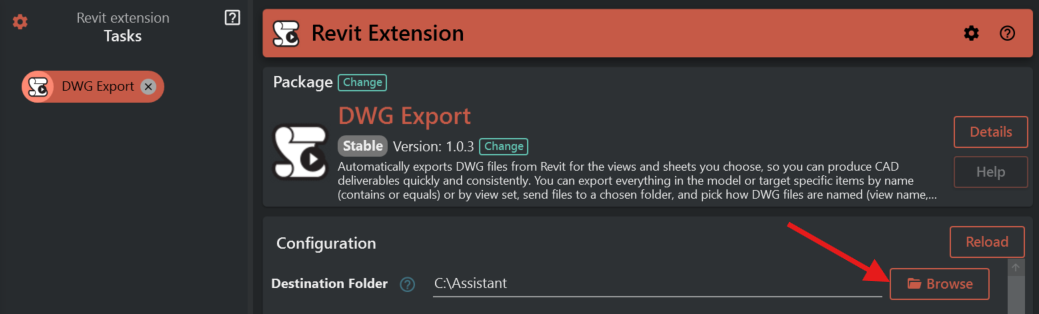
What it does: Selects the folder where exported DWG file(s) will be saved.
When it appears: Always.
Required: Yes.
If missing/invalid:
- If empty, the export stops.
- If the folder doesn’t exist, the tool tries to create it.
- If it can’t access or create the folder (permissions, invalid path), the export stops.
¶ 2. Choose What To Export
- Pick what you want to export (a single item like the active view, or multiple items like all sheets).
What it does: Controls what is exported.
When it appears: Always.
Required: Yes (a default is already selected).
If invalid: If an unsupported option is selected (not expected in normal use), the export fails.
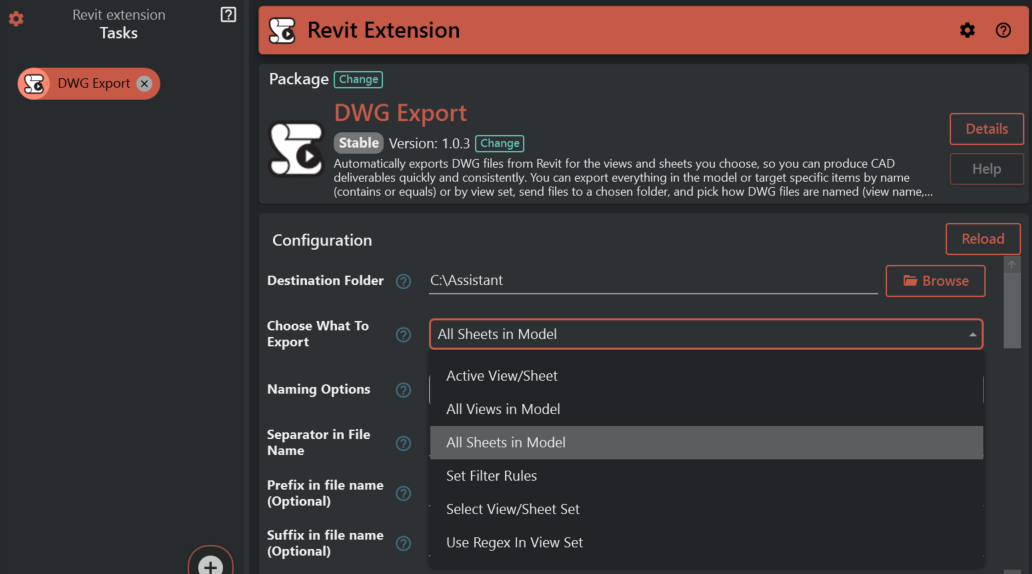
Options you may see:
- Active View/Sheet
- All Views in Model
- All Sheets in Model
- Set Filter Rules
- Select View/Sheet Set
- Use Regex In View Set
Each option is explained below.
¶ ActiveView
What it’s for: Export the currently active view (the one you are looking at).
Fields that become visible: No extra fields.
What it exports/produces:
- Exports one DWG file.
- If the active view is a sheet, it exports that sheet.
Common mistakes:
- Active view is not printable → export stops.
- You expected multiple exports → use AllViews, AllSheets, CustomFilter, ViewSet, or UseRegexInViewSet.
¶ All Views in Model
What it’s for: Export all printable views in the model.
Fields that become visible: No extra fields.
What it exports/produces:
- Exports multiple DWG files (one per exported view).
Common mistakes:
- Sheets are not included → sheets are skipped in this mode. Use AllSheets if you want sheets.
- Some views are skipped because they cannot be printed → check printability of those views.
¶ All Sheets in Model
What it’s for: Export all printable sheets in the model.
Fields that become visible: No extra fields.
What it exports/produces:
- Exports multiple DWG files (one per exported sheet).
Common mistakes:
- Some sheets are skipped because they cannot be printed → ensure those sheets are printable.
¶ Set Filter Rules
What it’s for: Export only the views/sheets that match rules you define.
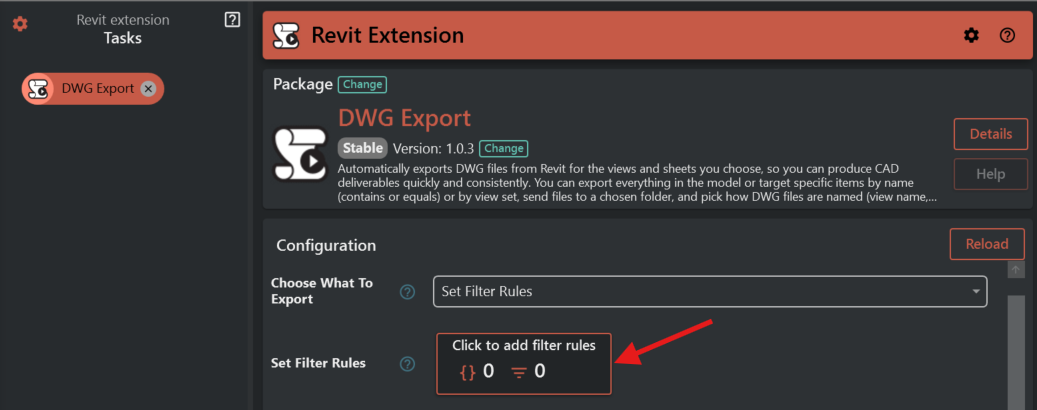
Fields that become visible:
- Set Filter Rules
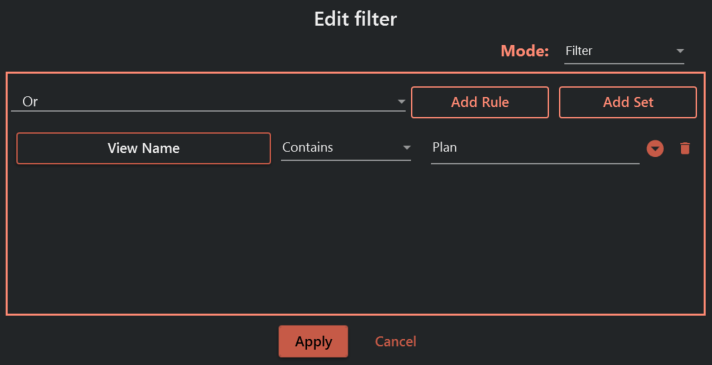
What it exports/produces:
- Exports one DWG per selected view/sheet (often multiple files).
Common mistakes:
- Forgetting to define rules → export stops because Set Filter Rules is required in this mode.
- Rules match nothing → export finishes with “No views or sheets were exported” (and may include failure details).
¶ Select View/Sheet Set
What it’s for: Export everything contained in a named view/sheet set.
Fields that become visible:
- View/Sheet Set
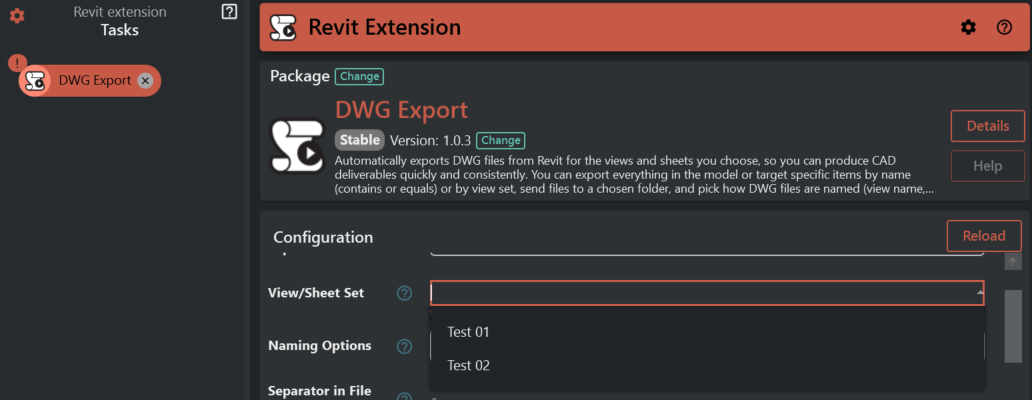
What it exports/produces:
- Exports one DWG per item inside the selected set (often multiple files).
Common mistakes:
- Typo in the set name → “View set not found.”
- Set contains items that cannot be printed → those items are skipped and shown as failures.
¶ Use Regex In View Set
What it’s for: Export view/sheet sets whose names match your Regex Pattern.
Fields that become visible:
- Regex Pattern
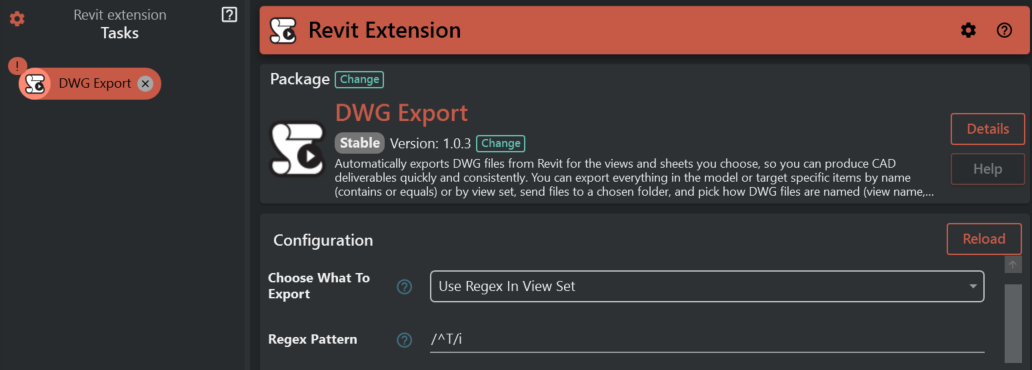
What it exports/produces:
- Exports one DWG per printable view/sheet inside every matching set (often many files).
Common mistakes:
- Pattern is empty or invalid → export stops.
- Pattern matches no set names → export stops with “No view set matches the regex pattern.”
- Pattern matches more sets than intended → narrow the pattern (for example add start/end markers like
^and$).
¶ 3. Naming Options
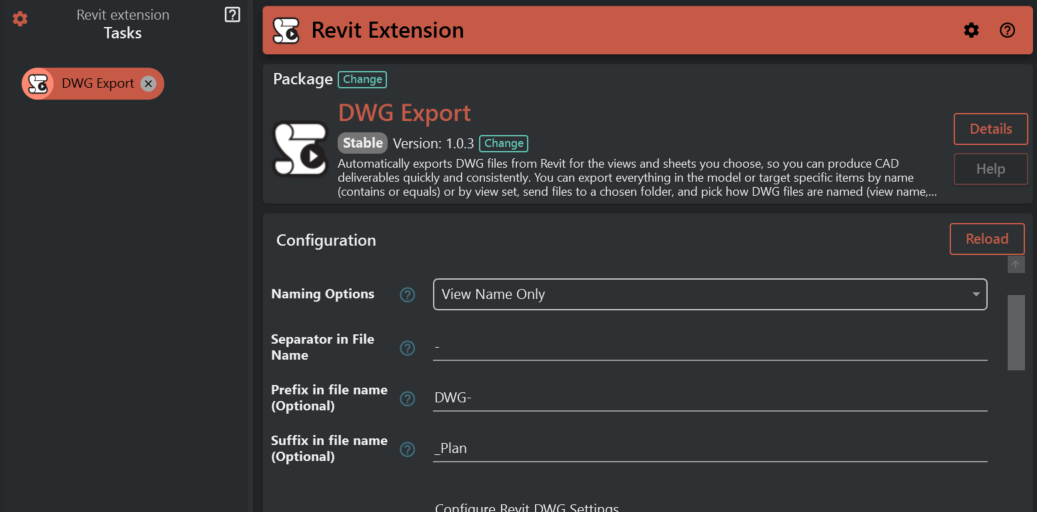
Choose a naming style for the exported DWG's.
Depending on what you choose, you will either configure simple parts (separator/prefix/suffix) or define a fully custom name
What it does: Controls how each exported DWG file is named.
When it appears: Always.
Required: Yes (a default is already selected).
Options you may see:
- View Name Only
- Model Name Only
- Model Name And View Name
- View Name And Model Name
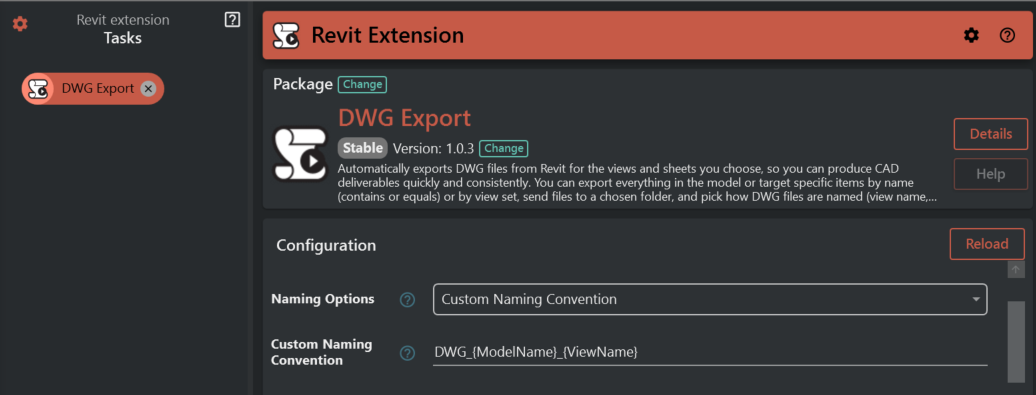
- Custom Naming Convention
How each option behaves is explained below.
¶ How file names are generated
- View Name Only : This option uses only the name of the view or sheet as the file name
- Model Name Only : This option uses only the model's name as the file name.
- Model Name And View Name : This combines the model name and the view name into the file name, separated by a defined separator.
- View Name And Model Name : This combines the view name and the model name into the file name, separated by a defined separator.
Custom Naming Convention : This allows you to define your own naming pattern by typing a custom pattern in the Custom Naming Convention field.
If missing/invalid:
- If empty, the export will fall back to using the view name.
What you can type (placeholders):
{ViewName}will be replaced with the view/sheet name.{ModelName}will be replaced with the model name.{AnyParameterName}can be replaced using values from the view/sheet (if that parameter has a value).
Examples you type:
{ViewName}_{Phase}DWG_{ModelName}_{Discipline}Custom-{ViewName}-v1
Invalid filename characters are automatically replaced with _.
¶ Separator in File Name
What it does: Text placed between name parts (for example between model name and view name).
When it appears: Only when Naming Options is NOT CustomNamingConvention.
Required: No.
If missing/invalid:
- If left empty, names may run together (harder to read), but export can still run.
¶ Prefix in file name (Optional)
What it does: Adds text at the beginning of every exported DWG file name.
When it appears: Only when Naming Options is NOT CustomNamingConvention.
Required: No.
If missing/invalid: If empty, nothing is added.
¶ Suffix in file name (Optional)
What it does: Adds text at the end of every exported DWG file name (before the file extension).
When it appears: Only when Naming Options is NOT CustomNamingConvention.
Required: No.
If missing/invalid: If empty, nothing is added.
¶ Examples (realistic)
Assume:
- Model name:
Airport_T1 - View/Sheet name:
A101 - Ground Floor - Separator in File Name:
- - Prefix in file name (Optional):
IFC_ - Suffix in file name (Optional):
_RevB
Examples of resulting names:
- Naming Options = ViewNameOnly →
IFC_A101 - Ground Floor_RevB - Naming Options = ModelNameOnly →
IFC_Airport_T1_RevB - Naming Options = ModelNameAndViewName →
IFC_Airport_T1-A101 - Ground Floor_RevB - Naming Options = ViewNameAndModelName →
IFC_A101 - Ground Floor-Airport_T1_RevB - Naming Options = CustomNamingConvention with
{ModelName}_{ViewName}→Airport_T1_A101 - Ground Floor
Tip: If you use Custom Naming Convention and include a placeholder that has no value, that part may remain unchanged in the name. Use only placeholders you know exist and have values.
¶ 4.Configure Revit DWG Settings
This section groups DWG export settings.
When it appears: Always (as a section title).
¶ ACA Preference
Controls how architecture objects are written into DWG.
¶ Colors
Controls how colors are written into the DWG.
¶ Export Of Solids
Controls how 3D solid geometry is exported (relevant for 3D views).
¶ File Version
Selects the DWG file format version to export.
¶ Export Unit
Controls the unit used when writing geometry.
¶ Line Scaling
Controls how line patterns are scaled.
¶ Export layer options
Controls how categories/graphics are mapped to DWG layers.
¶ Target Unit
Sets the target unit for the exported DWG.
¶ Text Treatment
Controls how text is translated into DWG.
¶ Export Areas
If enabled, area/room boundaries and geometry are included.
¶ Hide Reference Plane
If enabled, reference planes are hidden in the export.
¶ Hide Scope Box
If enabled, scope boxes are hidden in the export.
¶ Hide Unreferenced View Tags
If enabled, tags that are not referenced are hidden.
¶ Merge Views
If enabled, views may be exported using external references (XRefs).
¶ Preserve Coincident Lines
If enabled, overlapping/coincident lines are preserved.
¶ Shared Coordinate
If enabled, export uses shared coordinates; otherwise it uses the internal origin.
¶ Use Hatch Background Color
If enabled, hatch patterns export with their background color (if any).
¶ Mark Nonplot Layers
What it does: If enabled, layers whose names contain the provided nonplot suffix will be marked as non-plot.
Common note:
- This only has an effect when it is enabled and a suffix is provided.
¶ Nonplot Suffix
What it does: The text used to identify layers that should be marked as non-plot.
When it appears: Only when Mark Nonplot Layers is enabled.
Required: No.
If missing/invalid:
- If empty, nothing will be marked as non-plot.
¶ Understanding results and failures
- If nothing is exported, you will get a message saying no views or sheets were exported.
- If some items export and some fail/are skipped, you will get a message that the export completed with failures, plus a numbered list explaining each issue.
Common reasons items are skipped or fail:
- A view/sheet cannot be printed.
- A sheet was included in AllViews (sheets are skipped in that mode).
- The chosen view/sheet set cannot be found.
- No view/sheet set matches your Regex Pattern.
- The destination folder is missing or not writable.