¶ Set Links On Worksets And Pin Extension
¶ Overview
The Set Links On Worksets And Pin extension automates the process of organizing links into separate worksets, making it easy to open only the worksets/links you need when opening the model.
¶ Configuration
¶ File Extension Removal
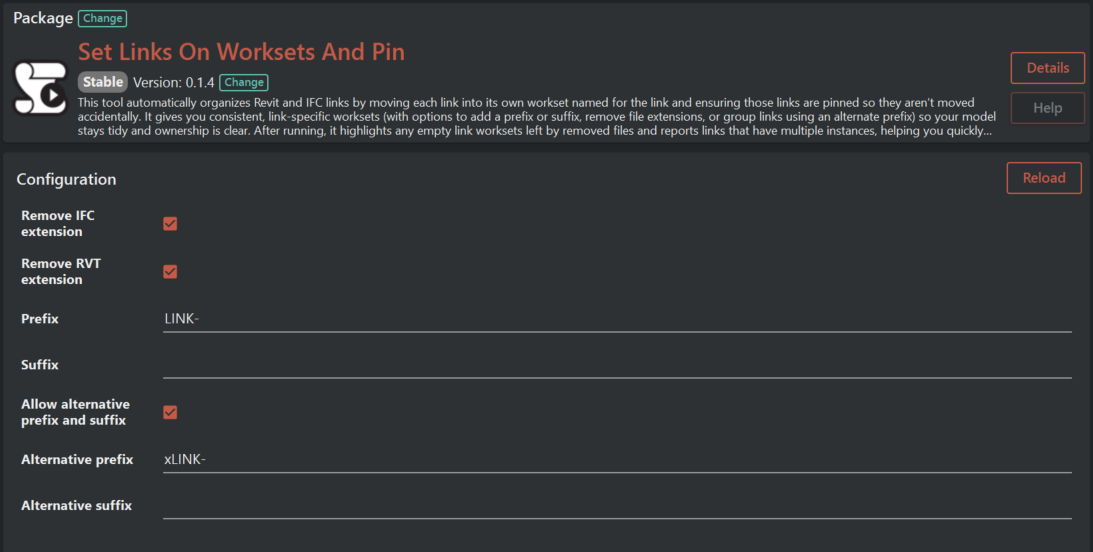
Options for stripping standard file extensions from the link names in worksets.
-
Remove IFC Suffix: If true, ".ifc" will be removed from the workset name.
Default: Enabled (true)
Result Example: An IFC link named "Building.ifc" results in a workset named "LINK-Building". -
Remove RVT Suffix: If true, ".rvt" will be removed from the workset name.
Default: Enabled (true)
Result Example: A Revit link named "Facade.rvt" becomes a workset named "LINK-Facade".
¶ Prefix/Suffix
Configure these to determine how the workset names are constructed.
- Prefix: This text is added before the link name.
Value: "LINK-"
Result Example: Given a link named "Building", the workset is named "LINK-Building". - Suffix: This text is added after the link name.
Default Value: (empty)
Result Example: With a suffix set as "_WS", a link named "Building" has a workset named "LINK-Building_WS".
¶ Allow alternative prefix and suffix
This setting enables the use of an alternate naming convention for specific links, providing flexibility in organizing workset names.
-
Allow Alternative Prefix and Suffix: When set to true, the extension will recognize and maintain workset names that start with the alternative prefix or end with the alternative suffix. If a workset with the alternative prefix or suffix already exists, the extension will not rename it to the default prefix/suffix format.
- Default: Enabled (true)
- Use Case: This is useful when you have groups of links that require distinct identification within a project, separate from the standard link naming convention.
For example, if you have standard links named with "LINK-" as a prefix, and you want to categorize and distinguish certain design links with "xLINK-", enable this option. When processing, the extension will accept both "LINK-Building" and "xLINK-DesignArea" as valid workset names, without renaming "xLINK-" prefixed worksets to "LINK-" prefix, thus keeping your categorization intact.
¶ Alternative Prefix/Suffix
These are used if you opt to categorize certain links differently.
-
Alternative Prefix: Used to group some links under a different naming convention.
Default Value: "xLINK-"
Result Example: With an alternative prefix and the main prefix as default, a link named "Building" results in "xLINK-Building". -
Alternative Suffix: Appends an alternative suffix to categorized links.
Default Value: (empty)
Result Example: With an alternative suffix "_ALT", the link "Building" would have the workset "LINK-Building_ALT".
¶ Workflow
- Activate the extension from the Revit ribbon toolbar.
- The extension will start processing all link types.
- Revit and IFC links are moved to their respective worksets, with any duplicate instances being reported.
- Links will be pinned to prevent unwanted movement.
- Upon completion, the extension will report any empty worksets and the number of changes it’s made to the project.
¶ Outputs
The extension outputs include:
- Empty worksets: Notifies you if there are any worksets that don't contain elements, suggesting they can be removed if a link has been deleted.
- Duplicate instances: Highlights if the same link is referenced multiple times.
- Change summary: A comprehensive log of all the actions performed by the extension – including the link names and corresponding worksets they have been moved to.
¶ Troubleshooting
If any errors occur, the extension will cancel the operation and provide a detailed message for diagnosis. Review the message and adjust the configuration or project setup as necessary before attempting to run the extension again.