¶ Drawing Dimension Check
This extension checks for all dimension types in drawings to check for the presence of text in dimensions.
¶ Purpose
The DrawingDimensionCheck extension helps users maintain drawing quality standards by:
- Identifying dimensions that are manipulated as text in Tekla Structures drawings
- Generating a CSV report of all dimensions that don't meet the standard
- Optionally changing the color of non-conforming dimensions for easy identification
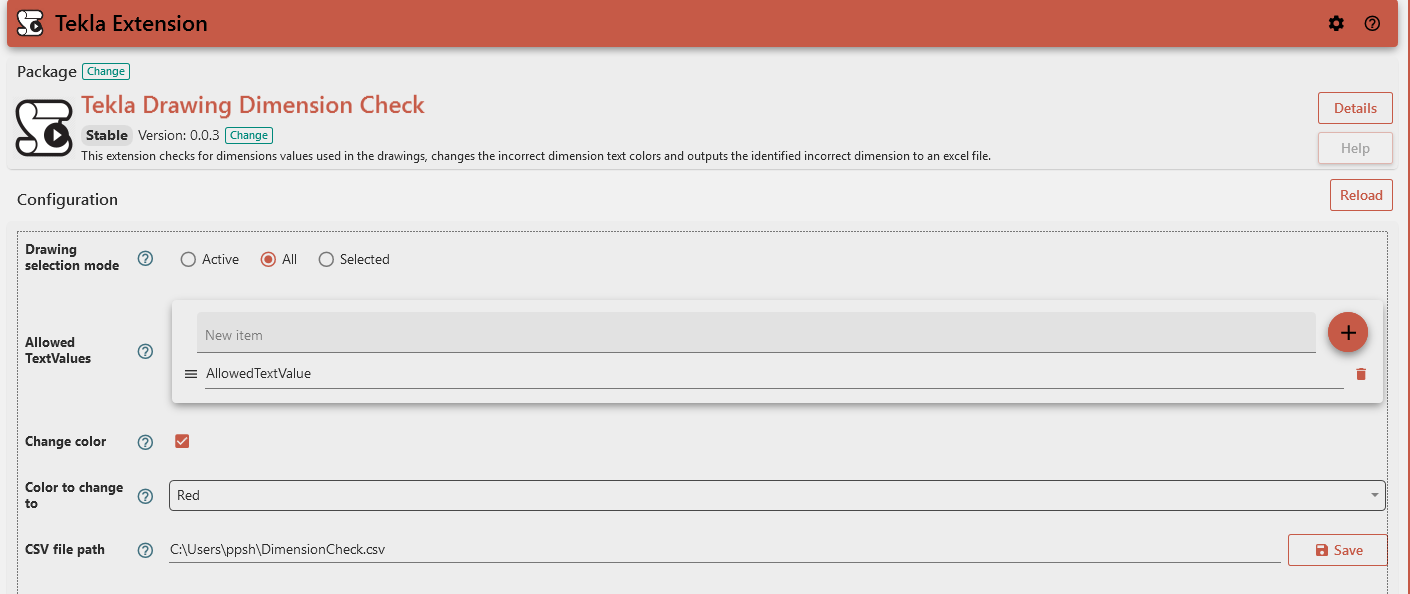
¶ Usage
¶ Configuration Options
¶ Drawing Selection Mode
Choose which drawings to analyze:
- All: Process all drawings in the model
- Selected: Process only drawings currently selected in the model
- Active: Process only the currently active drawing
¶ Allowed Text Values
Define which text values in dimensions are considered acceptable.You can customize this list according to your drafting standards.
¶ CSV File Path
Specify where to save the report of non-conforming lines. This field is required.
Example: C:\Tekla\DimensionsCheck.csv
¶ Change Color
When enabled, this option will automatically change the color of any dimensions with non-allowed text types.
¶ Color to Change To
If "Change Color" is enabled, this specifies which color to apply to non-conforming dimension texts.
Default: Red
¶ Output
The extension generates:
- A CSV file containing details of all non-conforming lines, with columns for:
- DrawingName - Name of the drawing
- Mark - Drawing mark reference
- DrawingTitle1 - Primary drawing title
- DrawingTitle2 - Secondary drawing title
- DrawingTitle3 - Tertiary drawing title
- Type - Incorrect dimension object type
- Font Name - Blank column required for the purpose of consolidation
- Font Height - Blank column required for the purpose of consolidation
- ModelIdentifier - Blank column required for the purpose of consolidation
- PartNumberPrefix - Blank column required for the purpose of consolidation
- PartNumberStart - Blank column required for the purpose of consolidation
- LineType - Blank column required for the purpose of consolidation
- A completion message indicating:
- Number of drawings checked
- Number of non-allowed dimension types found (if any)
- Whether the operation was successful
¶ Result Messages
- Success: "Checked X Drawings. No unauthorized dimensions were detected."
- Partial Success: "Checked X Drawings. Found Y incorrect dimensions."
- Error: Various error messages including:
- "CSV file path is empty. Please provide a valid path."
- Drawing update failures with specific drawing names/marks listed
- Any issues encountered while saving the CSV file
¶ Troubleshooting
- If you receive an error about an empty CSV path, ensure you've specified a valid file path.
- If no non-allowed dimension types are reported but you expect some, verify your "Allowed Text Values" list.
¶ Technical Notes
- The extension works with standard Tekla dimension types.