¶ Tekla Drawing Font Check
This extension checks drawings in your model for any non-allowed fonts. And it can also change the color of those fonts.
¶ Configuration
-
Check the checkbox if you want to inspect only the fonts of the selected drawings. Leave it unchecked to inspect all drawings.
-
Each row represents an allowed font. It must start with the font name, followed by semicolon and allowed heights for that font. Heights should be separated by semicolons
-
Check the checkbox if you want to change the color of the not allowed fonts.
-
Choose what color you want to change those fonts to.
-
Choose where you want to have the results saved as a csv
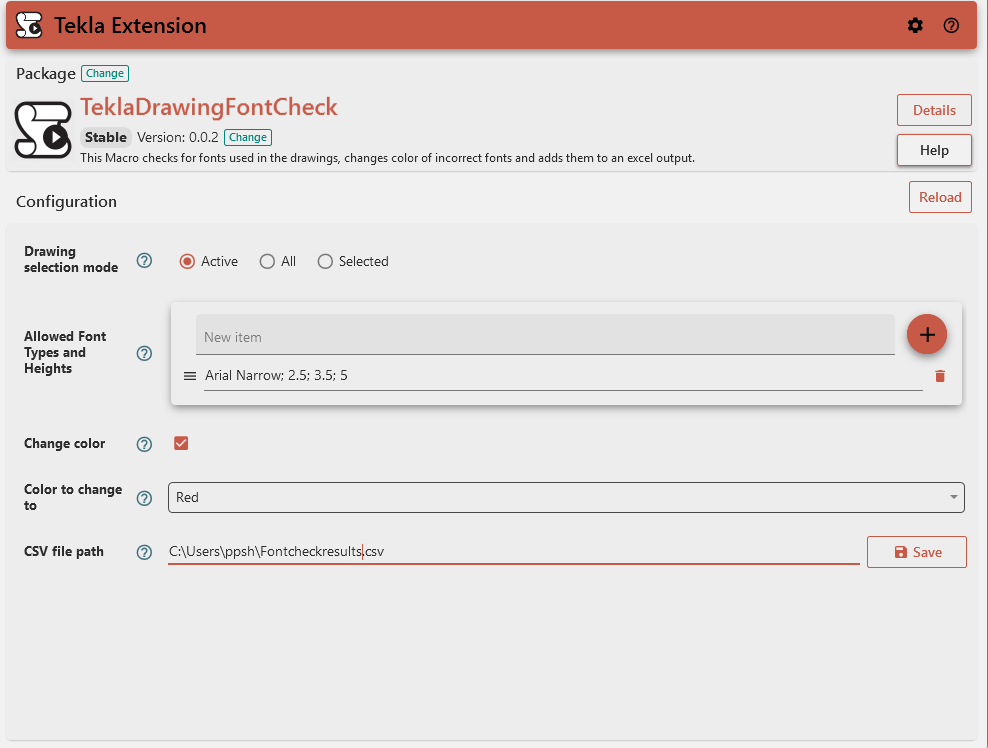
¶ Drawing Selection Mode
Choose which drawings to analyze:
- All: Process all drawings in the model
- Selected: Process only drawings currently selected in the model
- Active: Process only the currently active drawing
¶ Allowed Font Types and Heights
Define which font types and heights that are considered acceptable.
You can customize this list according to your drafting standards. These font types are not technically allowed by default - they are simply the built-in font types for Tekla. This means that users should remove any default values from this list if a particular type is not allowed in their project.
¶ CSV File Path
Specify where to save the report of non-conforming fonts. This field is required.
Example: C:\Tekla\FontTypesCheck.csv
¶ Change Color
When enabled, this option will automatically change the color of any objects with non-allowed font types.
¶ Color to Change To
If "Change Color" is enabled, this specifies which color to apply to non-conforming objects.
Default: Red
¶ Output
The extension generates:
- A CSV file containing details of all non-conforming objects, with columns for:
- DrawingName - Name of the drawing
- Mark - Drawing mark reference
- DrawingTitle1 - Primary drawing title
- DrawingTitle2 - Secondary drawing title
- DrawingTitle3 - Tertiary drawing title
- Type - Object type or whether the drawing requires numbering.
- Font Name - Object Font Name.
- Font Height - Object Font height.
- ModelIdentifier - Blank column required for the purpose of consolidation
- PartNumberPrefix - Blank column required for the purpose of consolidation
- PartNumberStart - Blank column required for the purpose of consolidation
- LineType - Blank column required for the purpose of consolidation
- A completion message indicating:
- Number of drawings checked
- Number of non-allowed font types found (if any)
- Whether the operation was successful
¶ Result Messages
- Success: "Checked X Drawings. No unauthorized fonts were detected."
- Partial Success: "Checked X Drawings. Found Y incorrect fonts."
- Error: Various error messages including:
- "CSV file path is empty. Please provide a valid path."
- Drawing update failures with specific drawing names/marks listed
- Any issues encountered while saving the CSV file
¶ Troubleshooting
- If you receive an error about an empty CSV path, ensure you've specified a valid file path.
- If no non-allowed font types are reported but you expect some, verify your "Allowed Font Types and heights" list.