¶ Open Solibri project
¶ Overview
Follow this guide to learn how to open a Solibri project file using the 'Open Solibri project' task.
¶ Step 1: Accessing the Open Task
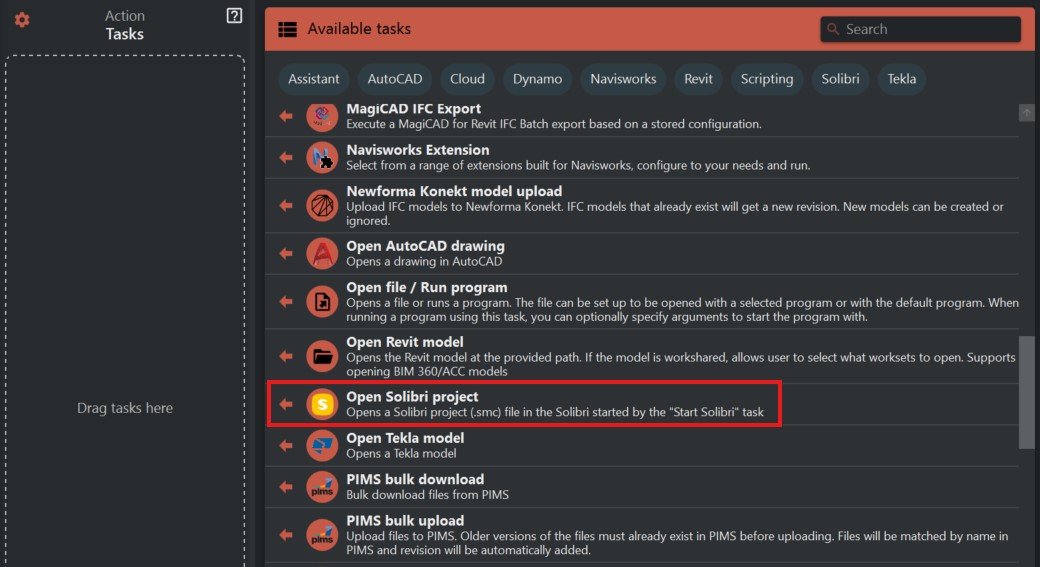
- Look to the right side of the screen to find the 'Available tasks' section.
- Identify and click on the ‘Open Solibri project’ task.
¶ Step 2: Preparing to Open a Project
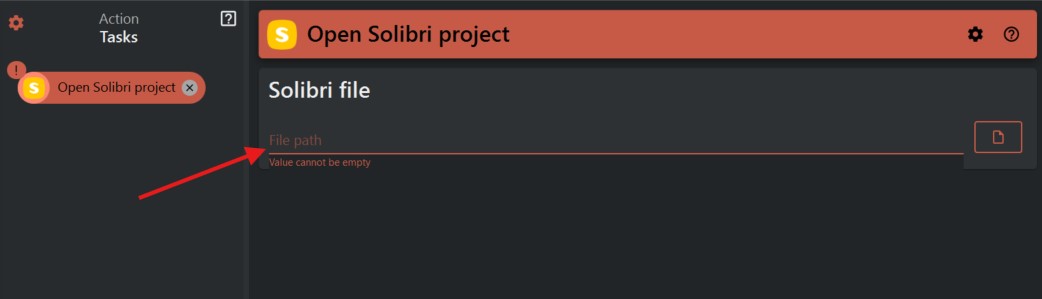
- In the task window, you will find a field labeled ‘File path’. Enter the full path to the Solibri project file (.smc) you wish to open.
¶ Step 3: Executing the Open Project Task
- Ensure that the file path entered is accurate and points to a valid Solibri project file.
- Once you have entered the file path, initiate the ‘Open Solibri project’ task..
¶ Step 4: Verifying the Project Opening
- Monitor the process to confirm that the Solibri project opens correctly.
- If the project doesn't open, verify the file path and file integrity, then try to open the file again.
¶ Important Notes
- Ensure the file path to the project is correct to prevent errors during the opening.