¶ Update IFC Files
¶ Overview
The 'Update IFC Files' task is designed to refresh IFC files within a specified directory or multiple directories. This function ensures that the most current version of IFC files are available for use in the workflow.
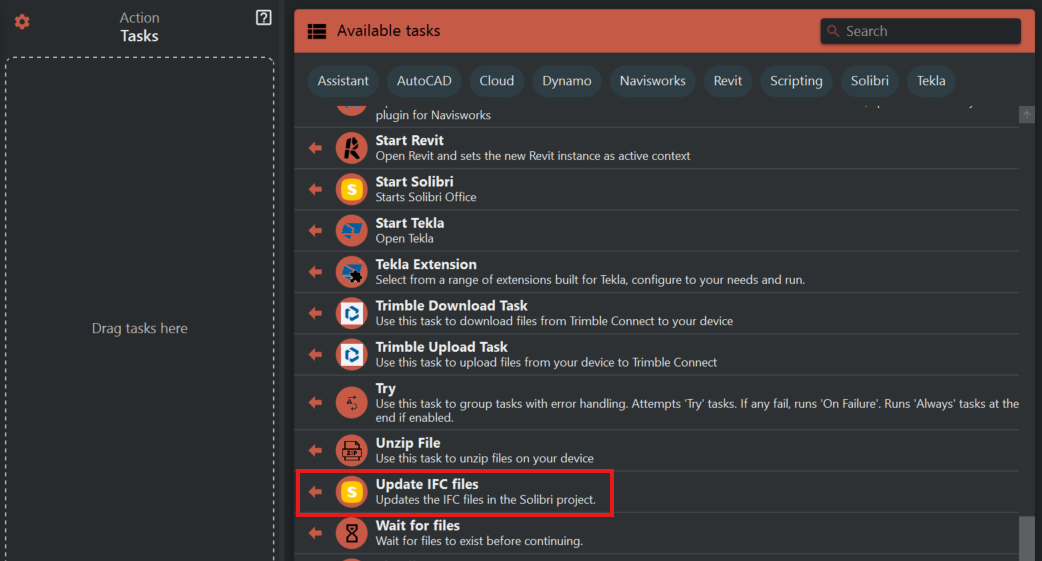
¶ Step 1: Locating the Update IFC Files Task
- Look to the right side of the screen to find the 'Available tasks' section.
- Identify and click on the ‘Update IFC Files’ task.
¶ Step 2: Adding Directories
- Click on the ‘Update IFC Files’ task to access its configuration.
- Select ‘Add directory’ to include a new path where IFC files are stored.
- For each directory:
- Use the text field to manually input the file path or use the folder icon to navigate and select the directory.
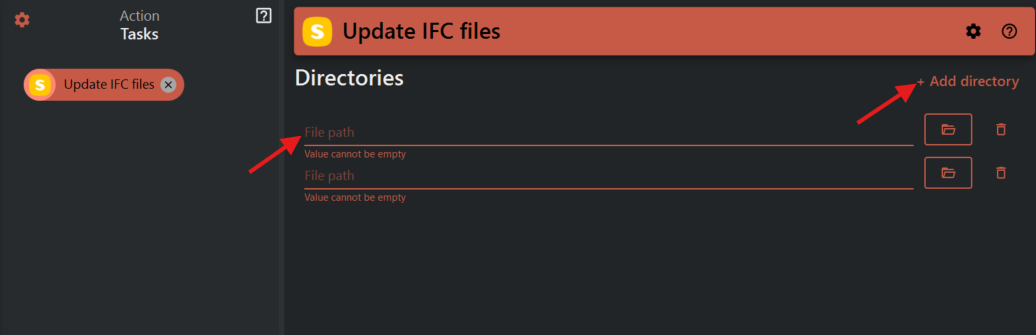
- Use the text field to manually input the file path or use the folder icon to navigate and select the directory.
¶ Step 3: Managing Multiple Directories
- To add additional directories, repeat the process by clicking ‘Add directory’.
- Each directory will have its own ‘File path’ field and corresponding folder icon for selection.
¶ Important Notes:
- Ensure that paths to directories are correctly input to avoid errors during the update process.
- If multiple directories are being used, verify that the correct file structure is maintained to ensure proper updating of IFC files.
- Use the folder icon for an intuitive and error-free way of selecting directories.