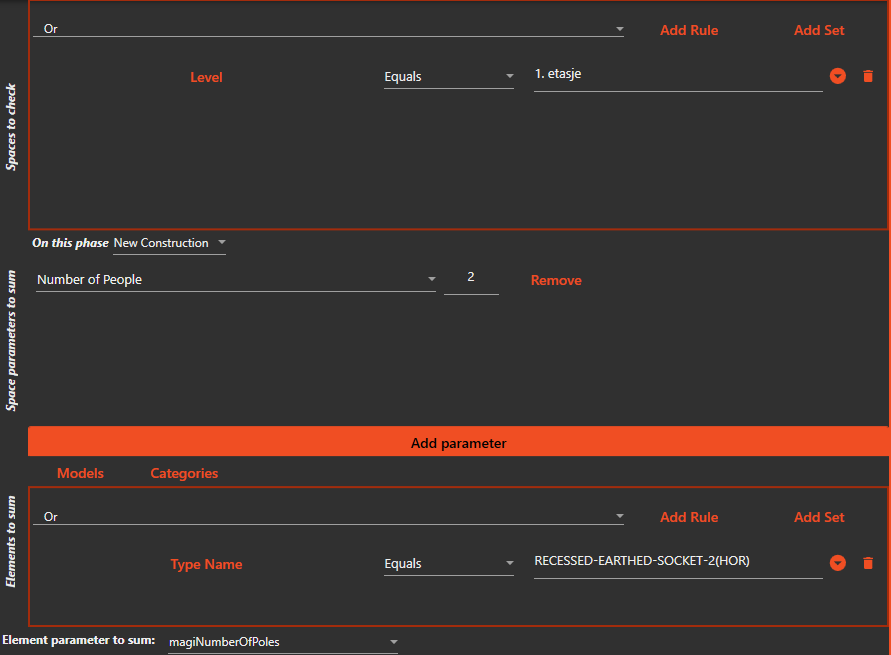
¶ Has Sum
The Has Sum Check allows users to verify if the sum of certain parameters on elements within a space match a specified value on the space itself.
- Start the Check&Fix program and open the desired model.
- Select the "Has Sum" check from the list of available checks.
- Select the "Spaces to check" filter, this filter will be used to determine which spaces will be checked.
- Select the parameters on the spaces that you want to compare the sum to. You can also choose to multiply the space parameter value with a number before comparing it.
- Select the "Elements to sum" filter, this filter will be used to determine which elements within the spaces will have their parameters summed.
- Select the parameter on the elements that you want to sum.
- Run the check. Any spaces that fail the check will be highlighted in the model and listed in the results.
- Optionally, you can save the results to a file for further analysis or generate a report.