¶ Relation between elements
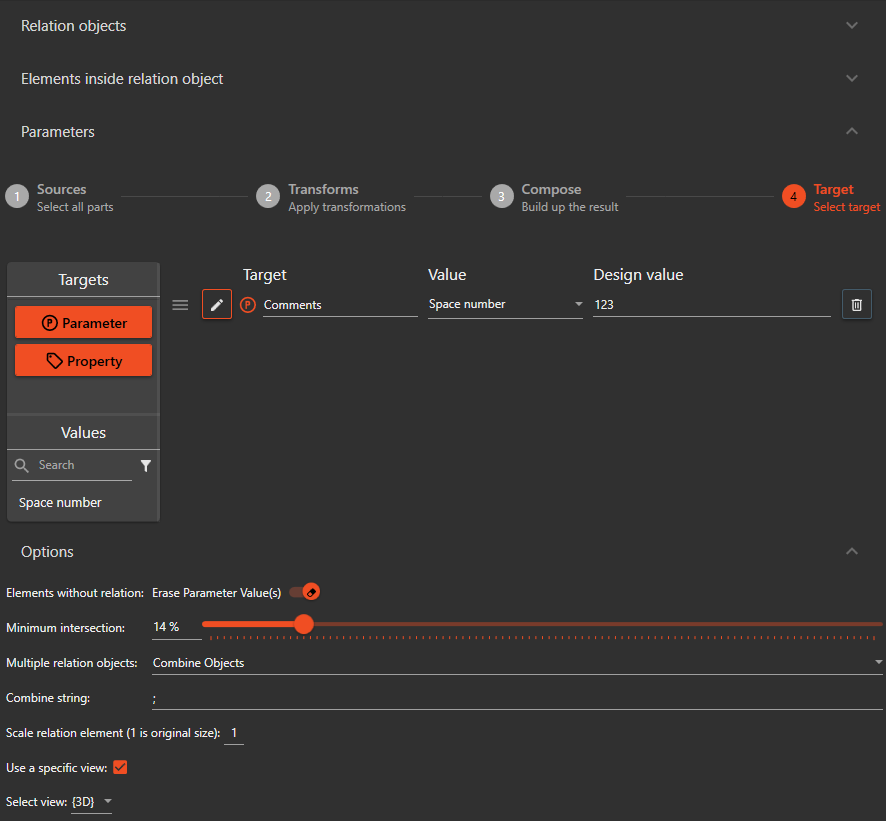
The Relation between elements check is used to find all elements from the specified Relation filter that intersect with elements from the specified Element filter. The user can configure parameter values to be copied using the Value Copy Control from elements in the Relation filter to elements in the Element filter.
¶ Elements without relation:
When an element in the element filter does not intersect with any elements from the relation filter, enabling this option will clear the value of the selected parameters on these elements.
¶ Minimum Intersection
The user can set a minimum intersection threshold. Any elements that do not meet this threshold will not be considered in the check.
¶ Multiple relation objects
When multiple relation objects are found, the user has the option to handle them in one of three ways:
- Combine objects: All relation objects will be combined into one
- Largest intersection volume: The relation object with the largest intersection volume will be used
- Smallest intersection volume: The relation object with the smallest intersection volume will be used
¶ Combine string
When multiple relation objects are combined, the user can specify a string to separate the values.
¶ Scale relation element
The user can specify a number to scale up the relation element before calculating the intersection.
¶ Use specific view
The user can choose to calculate the intersection using the geometry from a specific view.
¶ Example of usage
The user wants to find all relation elements (for example, structural columns) that intersect with elements from a specific filter (for example, walls) and copy the structural column's "Material" parameter to the walls. The user sets the Relation filter to "Structural Columns" and the Element filter to "Walls", then select the "Material" parameter to be copied. The check will then find all structural columns that intersect with walls and copy the "Material" parameter to the walls.