¶ Assistant 4.1.14
This release contains some new fatures and bugfixes.
¶ Assistant
- Continue on fail
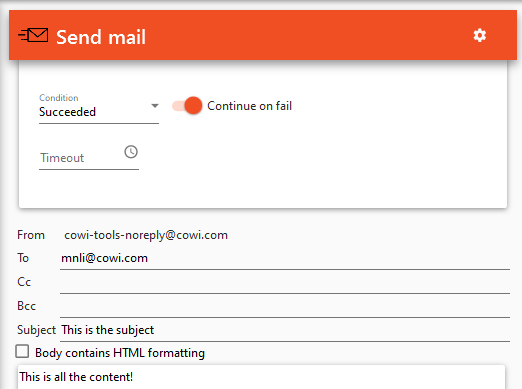
Expand the settings for a task by clicking the gear in the top right corner. Toggle "Continue on fail" to force the task to be partially successful if the task failed. This will make it possible for Assistant to continue running the action if the task failed. This setting is particularly useful for the Send mail task. For all tasks except Send mail, Continue on fail is by default disabled.
 - Improved description of the Open model task
The Open model task supports BIM 360 models, this is now stated in the description of the task. - Made 'Open model task'. more reliable by retrying if something goes wrong.
- Delete file task can now also delete a folder whit all its content
- Added option to use revit file name in Revit IFC export task
- Improved login experience and made logins stay signed in for longer.
- The "Tools Discipline" popup will not be closed when starting Revit with Assistant, instead of waiting for user to select discipline.
- Fixed Revit path issue in Open Model Template.
- When browsing BIM 360 project in Assistant, some projects got the wrong folder name. This is now fixed.
¶ Check&Fix
- Now has the same open file view as Assistant got in last version
- If multiple instances of the same link is selected, Check&Fix will now use the first one instead of failing.