¶ Assistant 5.3.0
¶ Assistant
- Macros for Revit, Tekla, Navisworks and AutoCAD are now updated to be built for each version of these programs, instead of building one macro for all versions. This allows the creator to support multiple versions.
- The above change results in the creation of multiple packages of the same macro being created, one for each version. To reduce the amount of visible packages, Assistant now filters the visible macros to match the version it is currently connected to. If not connected to any integration, all packages are displayed.
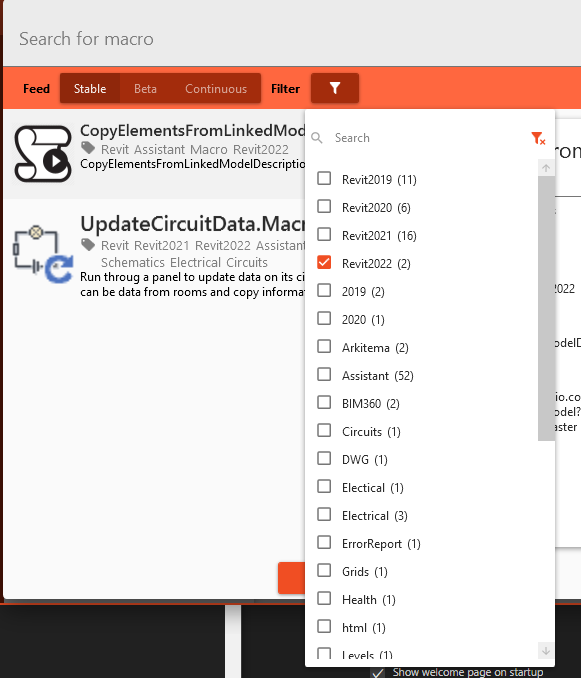
Make sure to check your filter setting if you are unable to find a macro. It might not be made for your current integration version (Revit, Tekla etc.). You can always try to use a macro for another integration version, but it may not work due to changes in the integration software.
- Tekla macros now support AutoFill, allowing macro creators to provide a more intuitive experience in their macros by letting the user select values from their model.
- Fixed issue where start Tekla task whould occasionally fail.
¶ Compiling a macro
After making changes to a macro you would want to compile it in order to test the code locally.
Depending on what version of Revit, Tekla, AutoCAD etc. you are compiling for, you have to adjust the command accordingly.
dotnet publish -c "Debug 2022"
Replace "2022" to fit the main version of the application you are creating a macro for.
¶ Examples
If you are building a macro for Revit 2021 use this command:
dotnet publish -c "Debug 2021"
If you are building a macro for Tekla 2020 use this command:
dotnet publish -c "Debug 2020"
¶ Check & Fix
- When performing relation check on large models, writing the result could lead to huge processing times due to inefficient code. By optimizing the code this was reduced from days to milliseconds.