¶ Models and AI Credits
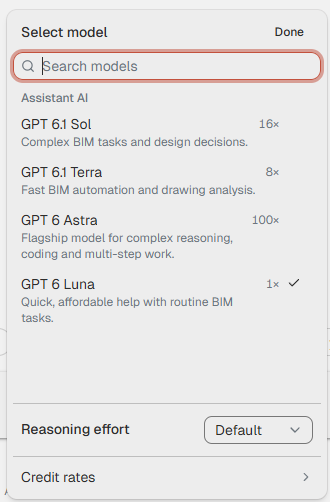
The menu under the message box, on the right, shows the AI model the chat uses. Click it to choose another model, or to change how much effort the model puts into an answer.
¶ Choose a model
- Start with the 1× model. It is the cheapest and the fastest.
- Switch to a stronger model when the answers are wrong, or the job is long or needs difficult scripts.
- The text under each model in the menu says what it is meant for.
- Reasoning effort sets how long the model thinks before it answers. Default suits most requests. Higher effort is slower and uses more Credits.
You can change the model in the middle of a chat. A reply that is already running finishes on the model it started with.
¶ How AI Credits work
The built-in AI service, Assistant AI, is paid for with AI Credits. The number beside each model is its cost compared with the cheapest model, which is 1×. The same message on a 16× model uses about sixteen times as many Credits. Credit rates, at the bottom of the menu, shows the exact rates per million tokens.
Your organization gets 80 Credits a month for each Assistant license it has, and can buy more by contacting sales at AEC. Your personal Credits are used first, then your organization's.
The ring beside the model shows how much you have used. Point at it to see how many Credits are left and when the monthly allowance refreshes. When less than 20 % is left, the number shows beside the ring.
When your Credits run out, sending pauses until more Credits are available. What you have typed stays in the message box.
Chats that use your own OpenAI, Azure AI Foundry or Ollama connection use no Credits. See Settings and IT.
¶ Long chats
Each model can only read a limited amount of text at once. When a chat reaches 80 % of that, the Agent replaces the oldest part of the chat with a summary and goes on. A summary can leave out details. Repeat limits that matter, such as "only level L2", when you ask for the next step. Point at the ring to see how full the chat is.
For a new job, start a new chat. It is faster and uses fewer Credits.