¶ Writing Help Files for Assistant Extensions
Help files are an essential part of your Assistant Extension's user experience. They provide guidance, instructions, and information that users need to understand and effectively use your extension. This guide will walk you through the process of creating help files for your Assistant Extension.
¶ Prerequisites
Before you begin, make sure you have:
- Published your Assistant Extension package in the Assistant Extension Package Browser.
- Accessed the detail page of your package by selecting the package in the browser.
¶ Creating Help Files
-
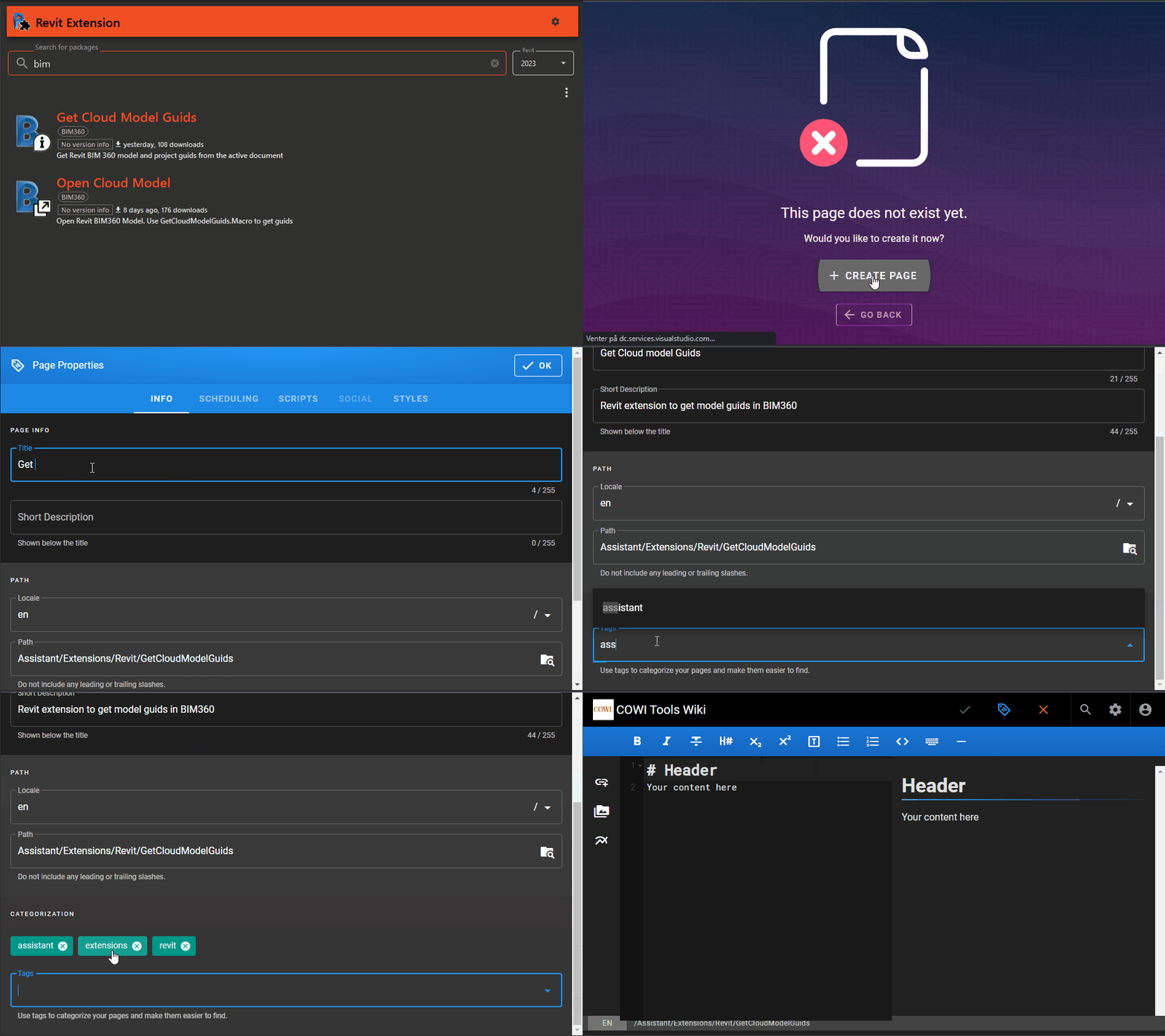
Navigate to the detail page of your Assistant Extension package by selecting it in the Assistant Extension Package Browser.
-
On the detail page, locate the link to access help files. Click this link.
-
You'll be taken to the Assistant Wiki, where you can create help pages for your extension. If the page does not exist, a "Create Page" button will be shown. Click this button.
-
You'll be prompted to select the page type. Choose "Markdown" as the format for your help file.
-
Provide the following details:
- Extension Title: Enter a clear and concise title for your extension.
- Extension Description: Write a brief description of your extension's purpose and main functionalities.
- Tags: Add relevant tags, such as "Assistant," "Extension," and your extension's type (e.g., "Assistant," "Revit," "Tekla," "AutoCAD," "Navisworks"). Tags help users easily find your help files.
-
Click the "OK" button to proceed.
-
Now, you can start filling in the content for your help file. Be sure to provide comprehensive documentation about your extension. Include details on:
- Input Configuration: Explain the input settings and parameters that users can configure.
- Extension Functionality: Describe what the extension does and how it benefits users.
- Visual Demonstrations: To enhance understanding, include GIF videos and/or pictures that demonstrate how to use the extension's features.
-
Once you've added your content, click the "CREATE" button to create the help file.
¶ Template for the help file content
# Extension Title

## Description

## Configuration

- **Setting 1**: Description of setting 1.
- **Setting 2**: Description of setting 2.

## Functionality

- **Description**: Explain the functionality.
- **How to Use**: Step-by-step instructions.
- **Visual Aids**: Screenshots or GIFs.

## Troubleshooting

### Issue 1

- **Causes**: Potential reasons.
- **Solution**: Steps to resolve.
- **Resources**: Links for assistance.

### Issue 2

- **Causes**: Potential reasons.
- **Solution**: Steps to resolve.
- **Resources**: Links for assistance.

## FAQ

- **Q: Question 1**
  - **A: Answer 1**
- **Q: Question 2**
  - **A: Answer 2**

## Resources

- Relevant external resources or links.

## Support

- How to get support or provide feedback.

## Version History

- **Version [Version Number] - [Date]**
  - **Change 1**: Description of change 1.
  - **Change 2**: Description of change 2.

- **Version [Version Number] - [Date]**
  - **Change 1**: Description of change 1.
  - **Change 2**: Description of change 2.

---

*Replace the placeholders with your extension-specific content.*
¶ Best Practices
To create effective help files, keep these best practices in mind:
- Be Precise: Provide clear and precise information to help users understand your extension quickly.
- Visual Aids: Use GIF videos and images to visually demonstrate complex processes.
- User-Focused: Think from the user's perspective and structure your help file accordingly.
By following these steps and best practices, you can create informative and user-friendly help files for your Assistant Extension, enhancing the user experience and the utility of your extension.
¶ ChatGPT Prompt for GitHub Copilot Agent
Use this prompt to generate help file documentation for Assistant Extensions. The GitHub Copilot agent has access to your workspace files and can automatically identify the extension type and configuration.
I need you to create a comprehensive help file for an Assistant Extension following the template below.

## Context
Assistant is an automation platform that lets users set up sequences of tasks that execute in order. Tasks can be built-in or custom extensions created by developers in C#. Extensions can integrate with Revit, Tekla, AutoCAD, Navisworks, or run standalone.

## Instructions
1. Analyze the workspace files to determine:
   - Extension type by detecting the interface (IRevitExtension, ITeklaExtension, IAutoCadExtension, INavisworksExtension, or IAssistantExtension)
   - Extension ID from the .csproj file's <ExtensionId> property
   - Configuration class (file ending with Args.cs)
   - Command class (file ending with Command.cs)

2. Generate documentation that:
   - Uses the Extension ID to create a user-friendly title (e.g., "MyExtension" becomes "My Extension")
   - Explains configuration properties as UI input fields for engineers/architects (non-coders)
   - Describes the Run method's functionality in plain language for engineers/architects
   - Includes practical examples and use cases
   - Follows the template structure below

3. Focus on:
   - Clear, non-technical language suitable for engineers and architects
   - Step-by-step instructions
   - Practical troubleshooting guidance
   - Common use cases and workflows

## Template

# Extension Title

## Description
[Brief overview of what the extension does and its primary purpose]

## Configuration

- **Setting 1**: [Description of what this setting controls, what values are expected, and how it affects the extension's behavior]
- **Setting 2**: [Description including any default values, units, or special considerations]
[Continue for all configuration properties from the Args class]

## Functionality

### Description
[Explain what the extension does step-by-step in the Run method, using plain language]

### How to Use
1. [Step 1: Prerequisites or setup required]
2. [Step 2: Configuration steps]
3. [Step 3: Execution and what to expect]
4. [Step 4: Verification of results]

### Visual Aids
[Note: Screenshots or GIFs should be added here to demonstrate the process]

## Troubleshooting

### Issue 1: [Common problem that might occur]
- **Causes**: [Why this might happen]
- **Solution**: [How to resolve it]
- **Resources**: [Links or references for more help]

### Issue 2: [Another common problem]
- **Causes**: [Potential reasons]
- **Solution**: [Steps to resolve]
- **Resources**: [Links for assistance]

## FAQ

- **Q: [Common question about when to use this extension]**
  - **A: [Clear answer with examples]**
- **Q: [Question about configuration or limitations]**
  - **A: [Answer with technical details explained simply]**

## Resources

- [Links to related documentation]
- [Reference to similar extensions or workflows]
- [External resources if applicable]

## Support

For assistance or to report issues:
- [Support contact information]
- [Issue tracking location]
- [Community resources]

## Version History

- **Version 0.0.1 - [Date]**
  - Initial release
  - [Key features included]

---

*This documentation was generated based on the extension's code structure.*

## Best Practices for the Generated Documentation

The agent should ensure the help file:

- **Is Precise**: Provides clear, specific information without unnecessary jargon
- **Uses Visual Context**: Notes where screenshots/GIFs would enhance understanding
- **User-Focused**: Written from an engineer's or architect's perspective, not a developer's
- **Includes Real Examples**: Based on the actual configuration properties and logic in the code
- **Explains Units**: Clarifies measurement units (mm, feet, etc.) when relevant
- **Describes Validations**: Mentions any requirements (e.g., "Active view must be a 3D view")
- **Lists Limitations**: Notes any constraints or known issues found in the code
¶ Example Usage
Simply ask the agent:
Create a help file for this Assistant Extension
The agent will:
- Auto-detect that it's a Revit extension (from IRevitExtension)
- Read the ExtensionId from the .csproj file
- Parse the Args.cs file for configuration settings
- Analyze the Command.cs Run method for functionality
- Generate comprehensive markdown documentation