¶ Clear Parameters On Copy
¶ General
This Revit extension clears selected parameters when a element is copied.
¶ Description
The Clear Parameters On Copy extension allows users to automatically clear specified parameter values when copying elements in a Revit project. This is particularly useful for workflows that require resetting parameter data during the duplication of Revit elements.
Use Assistant Event Shortcut to activate the extension when a model is opened.
See Assistant Event Shortcut for more detail
¶ Configuration
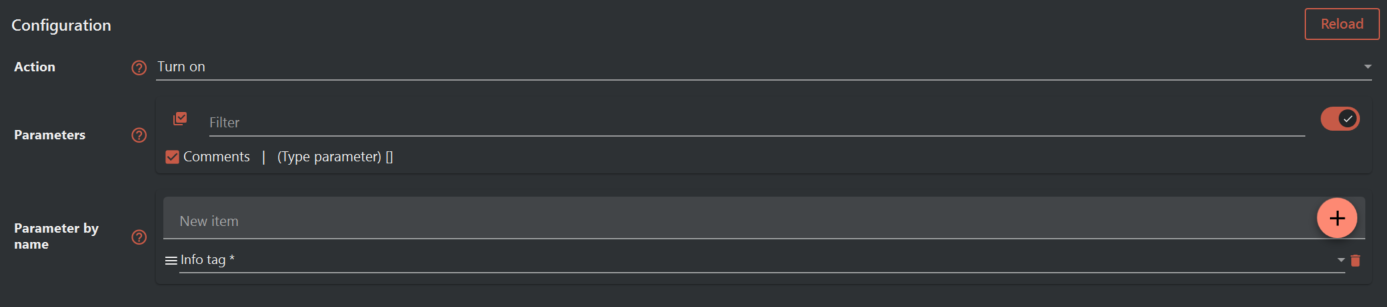
This extension includes various settings that are parsed by the Assistant and displayed as input fields in the task configuration. These settings allow users to define how the extension behaves.
-
Action:
- Description: Turn the functionality on or off.
- Details:
- Turn on: Clears the parameters when an element is copied.
- Turn off: No parameters are cleared during the copy process.
- Remarks: When the functionality is turned on multiple times, the previous settings are overwritten.
-
Parameters:
- Description: The parameters to be cleared when an element is copied.
- Details:
- Select the specific parameters that should be cleared. Parameters with
ElementIdvalues are not supported.
- Select the specific parameters that should be cleared. Parameters with
-
Parameter by name:
- Description: Parameters referenced by name that should be cleared when elements are copied.
- Details:
- You can use wildcards (e.g.,
Length*to match multiple parameter names likeLength1,Length2).
- You can use wildcards (e.g.,
¶ Functionality
¶ Description
The extension works by monitoring element copying actions in Revit and automatically clearing the values of specified parameters. Depending on the configuration, users can clear specific parameters or sets of parameters based on their names. This process is controlled by Revit's UpdaterRegistry, which triggers actions when elements are duplicated.
¶ How to Use
- Open the Assistant and create a new task for your Revit project.
- Select the Clear Parameters On Copy extension.
- Configure the extension by specifying the action (turn on/off) and the list of parameters or parameter names to clear.
- Run the task to activate the extension during element copying.
- Add this action file as a Event trigger as described.
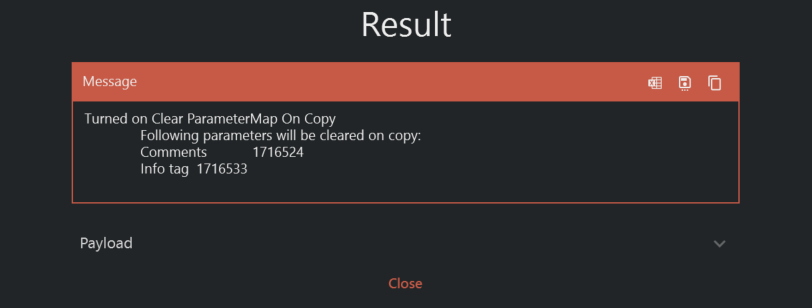
The extension reports witch parameters that will be cleared
¶ Troubleshooting
¶ Issue 1: Parameters Not Cleared
- Causes: Incorrect parameter names or unsupported parameter types.
- Solution: Verify the parameter list and ensure
ElementIdparameters are excluded. - Resources: Check the Revit documentation for parameter details.
¶ Issue 2: Extension Not Triggering
- Causes: The extension might not be registered correctly or there is no active Revit model.
- Solution: Ensure the extension is enabled and Revit has an active document open.
- Resources: Review the logs for any error messages.
¶ FAQ
-
Q: Can I use wildcards for parameter names?
- A: Yes, you can use wildcards like
Length*to match multiple parameters.
- A: Yes, you can use wildcards like
-
Q: What happens if no parameters are specified?
- A: If no parameters are specified, the extension will not clear any values when elements are copied.