¶ Inline
Inline looping task allows you to set up a table of data with rows and columns. When running this task, Assistant will iterate over every row in the table.
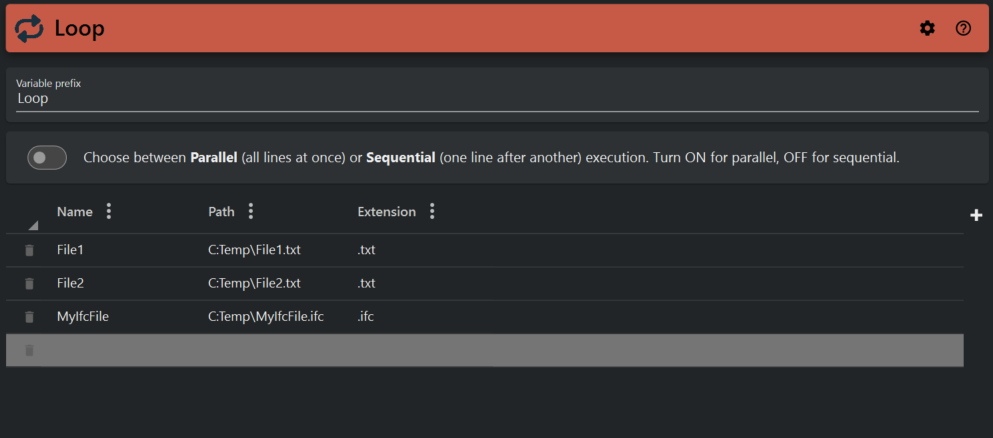
¶ Edit the table
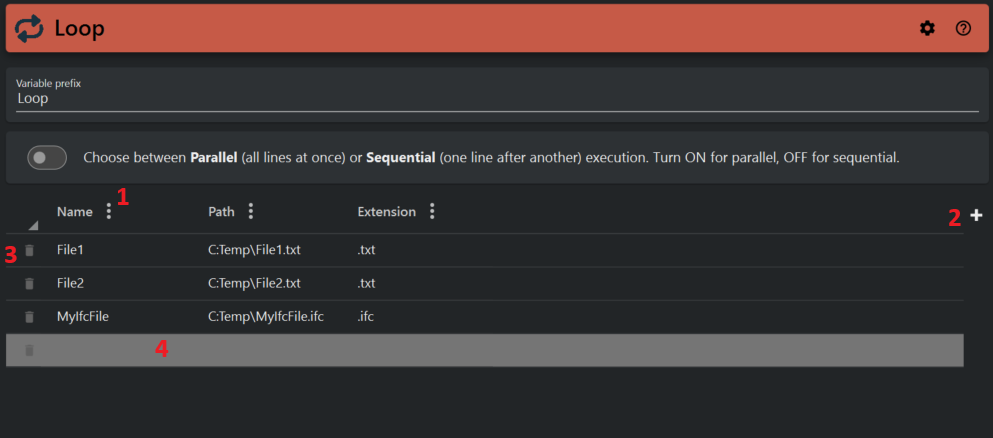
- Click the three dots on a column to reveal menu options for deleting or renaming a column.
- Click the plus symbol to add a new column.
- Click the trash bin icon on a row to delete the row.
- Click on a cell in any column or row to add or edit data.
¶ Example
When running this task, Assistant will create variables that are available to other tasks within your loop.
See Loop task for information on how to add tasks into your loop.
-
Iteration 1
${{Loop.Name}}will have the value "File1"
${{ Loop.Path }}will have the value "C:\Temp\File1.txt"
${{ Loop.Extension }}will have the value ".txt" -
Iteration 2
${{Loop.Name}}will have the value "File2"
${{ Loop.Path }}will have the value "C:\Temp\File2.txt"
${{ Loop.Extension }}will have the value ".txt" -
Iteration 3
${{Loop.Name}}will have the value "MyIfcFile"
${{ Loop.Path }}will have the value "C:\Temp\MyIfcFile.ifc"
${{ Loop.Extension }}will have the value ".ifc"