¶ Assistant 6.8.0
¶ Assistant
¶ Features
-
An experimental AI Agent Task has been added, allowing you to describe automation goals in plain English. This new feature uses AI to perform tasks across various applications by leveraging the new Model Context Protocol (MCP) integration. For a detailed guide, please refer to the AI Agent Task Documentation.
-
Added a new Try task in the Assistant, allowing users to define tasks with failure handling and configure tasks in an "Always" block to run at the end regardless of success or failure.
-
Added new action run and trigger variables enabling users to access action-specific info such as file path, action name, and task name, as well as pass the file path of the triggering file. For more details, see: Built-in variables
-
Enhanced the Loop task’s "Pattern" field to accept Assistant variables during preview, in addition to existing regex support.
-
Added support for drag-and-drop of multiple tasks simultaneously within an action.
-
Added support for creating a Trimble Connect client directly from extensions.
¶ Bug Fixes
- ProjectWise download task now correctly maps login requirements, removing the unnecessary ArcGIS login prompt.
- Value Copy control supports Revit extension tasks properly, allowing accurate parameter copying.
- Filter control in Revit extensions now automatically selects the active model when using pre-built configurations.
- SetActiveViewTask now displays the complete view list, restoring proper view selection.
- False error reports in the Loop task’s configuration view have been eliminated.
- Trimble Connect login issues have been resolved to ensure successful authentication.
- MagiCAD IFC export now works correctly in Revit 2022.
- File downloads from PIMS can now proceed without errors.
- Switching between selection modes in the filter control correctly updates the active document selection.
- Conditional blocks now retain empty comparison values in "Else if" blocks, preventing unintended inheritance from other blocks.
- "Expand all" in the details view now properly expands every failed task in an action run file.
- The View Runs screen now displays action runs correctly and supports drag-and-drop functionality.
- PIMS task login view can be opened from "Required Logins" and closed from "Missing Logins" on the Home page without issues.
- Loop variables passed as file paths in the "Run Action File" task are now correctly resolved.
- SetVariablesTask result view has been improved to show full variable values.
- Help, Wiki, Video, and BIM Dashboard links now open properly in Revit 2025.
- Changing comics in the Assistant no longer triggers errors.
- Fixed an issue where using Expand all in the details view did not expand every failed task after opening failed tasks from an action run file.
¶ Coordination Tool
¶ Features
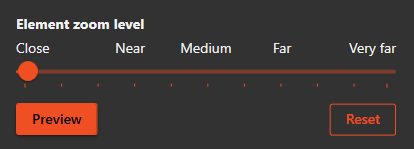
- Configurable element zoom
-
You can now control how much the viewer zooms in when focusing on an element.
-
Your chosen zoom level is saved to your user settings.
-
Preview applies the zoom to the currently selected element so you can test it immediately.
-
Reset restores the zoom level back to the default.
-
This option will be available under settings in the hamburger menu.
-
¶ Bug Fixes
- Fixed a bug that caused 'Model group' types to disappear from the Coordination Tool type selector and restored their visibility as before.
¶ Check and Fix
¶ Bug Fixes
- Fixed an issue where the UI displayed a disposed check view when opening a new checker file.
¶ Space Manager
¶ Bug Fixes
- Fixed an issue in Space Manager where some rooms from linked models were not found due to incorrect level associations in Revit.
- Fixed an issue in Space Manager where unchanged parameter values were incorrectly reported as updates due to trailing spaces. Parameter values are now trimmed before comparison.
- Restored the progress bar display in the Space Manager button during space mapping, preventing it from appearing empty while progress is ongoing.
- Resolved an issue in Space Manager where the update phase failed with the error "ElementId cannot be deleted"
- Fixed Space Manager to create or update spaces according to the phase of the linked model’s room instead of always using the active view’s phase.
- Fixed an issue where shared parameters were not copied to newly created spaces when using the parameter copy setup.
- Fixed the Parameter Copy setup in Space Manager so that the "From Parameter" selector now correctly displays parameters from linked models instead of only the current model.
- Enhanced the Duplicate Rooms view to display both the "Key" parameter and the Unique ID for each room, making it easier to identify and distinguish duplicates.